
Patient Portal
Patient Portal
Our patient portal gives you (and your account representative, if you have one) secure access to your health record. Complete your paperwork before a visit, message our team, view results, and pay your bill from your phone, tablet, or computer.
Our portal has a new address: westgaderm.modmedapp.com/patient-portal. If you saved the old westgaderm.ema.md address, please update your bookmark.
Signing in to your portal
The portal works in the web browser on your phone or tablet as well as on a computer. You can also use the free APPatient™ app for Apple or Android.
- Go to westgaderm.modmedapp.com/patient-portal
- Or open the APPatient™ app
- Enter your first name, last name, and date of birth, then select "Confirm Identity"
- Enter your one-time code
- Follow the prompts to have a code sent to you, then enter it to sign in
- No code? Check your text messages and your email's junk or spam folder, or call us at (770) 676-3376 and we can help
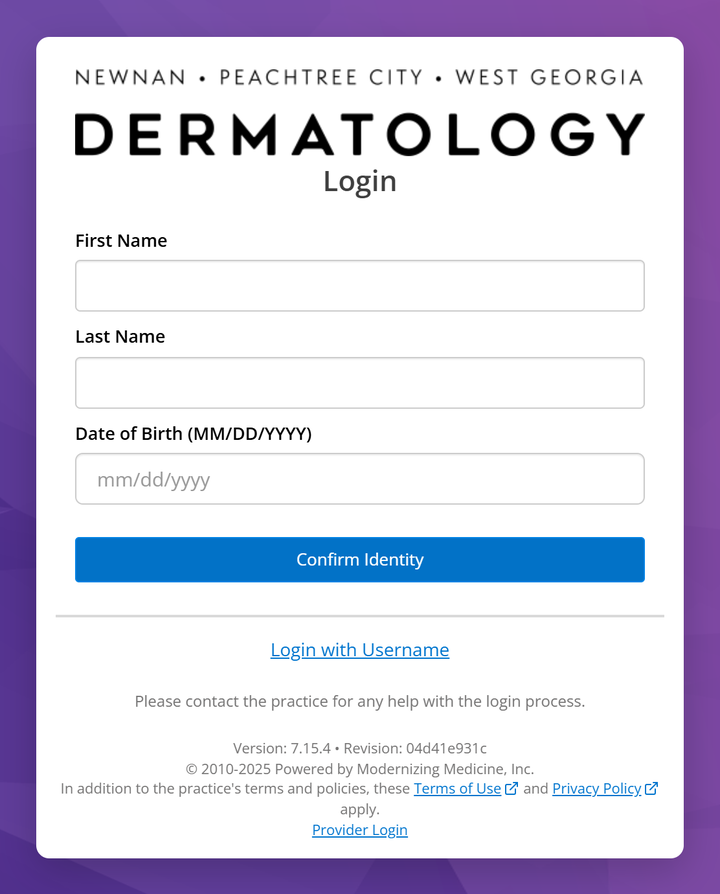
Prefer a username and password?
- On the sign-in page, select "Login with Username"
- Enter your Username
- Your username is typically your email address, but we may have customized your username if your email address could not be used
- Enter your Password
- If you have never set your password, or you do not remember your password, select "Forgot Password"
- The Password Reset page will ask you for your Username, Date of Birth, and Last Name. If you do not receive a Password Reset email, please call us at (770) 676-3376, and we can assist you in accessing your patient portal
What the portal looks like
The same portal fits your screen, whether you use a phone or a computer. The menu takes you to My Health, Appointments, Messages, My Forms, Tests and Results, and Billing. On a phone, open it with the menu button at the top left.
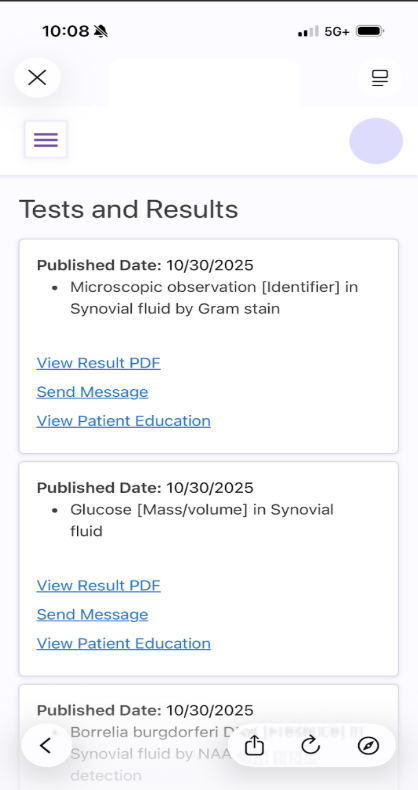
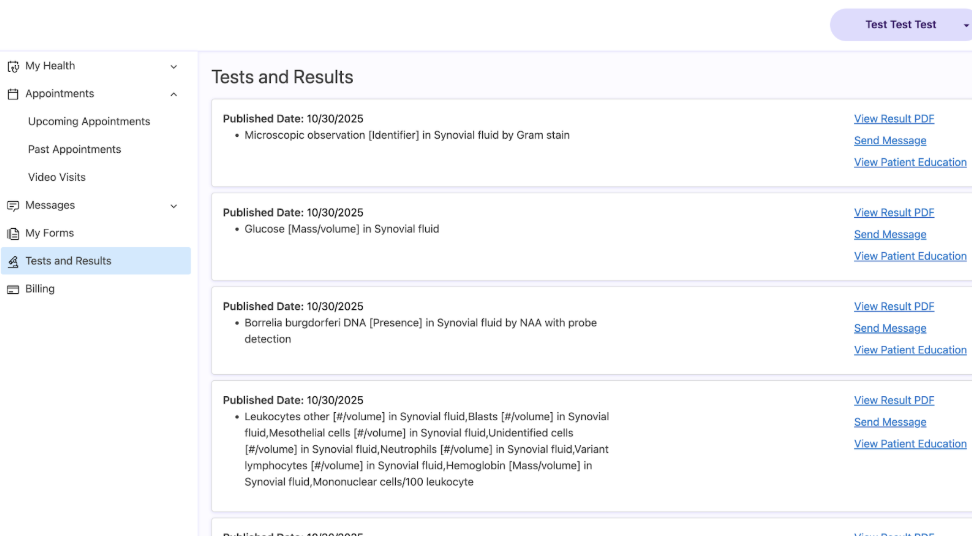
Sample screens from ModMed showing a test patient. When you sign in, you will see your own information.
Do your new patient paperwork online
- After signing in, open "My Health" from the menu. On a phone, tap the menu button at the top left first.
- Select "Medications" and enter your medications.
- If you do not take any medications, mark that you take none
- Select "Allergies" to enter your medication allergies, or mark that you have no known allergies.
- Select "History" to fill in your medical conditions and surgical history, your skin conditions (including sun protection and any family history of melanoma), and your social history (smoking, alcohol and drug use, occupation, and residence).
- Select "Insurance and Pharmacy" to review your insurance and add your preferred pharmacy, so your prescriptions go to the right place.
- If we have sent you forms, open "My Forms", select "Start" on each one, and select "Submit Form" when you are done. "Save and Exit" keeps a form open so you can finish it later.
Frequently asked questions
Our patient portal is a free, secure website where you can review your Peachtree City Dermatology health information. It is run by ModMed®, the company behind our electronic health record, so the sign-in pages are on ModMed's secure website and show our logo. The APPatient™ app gives you the same portal on your phone.
You can view your test results, see your upcoming and past appointments, review your medications and health conditions, complete forms before a visit, send our team a secure message, and pay your bill. For anything urgent, please call us. In an emergency, call 911.
During your visit to Peachtree City Dermatology, be sure to provide a valid email address and ask for portal activation. You will be sent a welcome email with an "Activate Account" link that expires in 72 hours. Select it and follow the prompts to confirm your identity. After that, you can sign in any time at westgaderm.modmedapp.com/patient-portal or in the APPatient™ app (Apple or Android).
We will provide you with a username and password. Go to westgaderm.modmedapp.com/patient-portal and select "Login with Username". Upon first login, you will be prompted to change your password. The password must be at least 8 characters and contain 1 uppercase letter, 1 number, and 1 symbol.
The Peachtree City Dermatology Patient Portal is at westgaderm.modmedapp.com/patient-portal. If you saved the old westgaderm.ema.md address, please update your bookmark.
Yes. The portal now works in the web browser on phones and tablets as well as on computers, so the app is optional. It is also easier to move around the portal using a keyboard or voice commands.
The portal is a safe, secure, and confidential website that protects your personal health information. To keep your account secure, never share your password or sign-in codes with anyone.
You can sign in with your name, date of birth, and a one-time code instead. To reset your password, select "Login with Username", then "Forgot Password". An email will be sent to you within 24 hours to reset your password. Remember to check your Junk and/or Spam folders.
You can sign in to your portal from any computer by visiting westgaderm.modmedapp.com/patient-portal.
Need help with the portal?
Call us and we'll walk you through activation, signing in, and paperwork.